Features for billiard clubs: bookings, floor and lights
ClubSystem is comprehensive software for managing billiard clubs. Discover all the features that will help you increase bookings, eliminate no-shows and save time on customer service. See how light control works
See the features in action
A 60-second walkthrough of ClubSystem: setting up a billiard club, taking an SMS-confirmed online booking, and checking the guest in.
Core features
Everything your club needs
Each feature was designed with the specifics of billiard clubs in mind. The system is continuously developed based on feedback from club owners.
24/7 online bookings
Customers book pool tables, snooker tables, dart zones and VIP lounges at any time of day or night. The system automatically shows real-time availability.
- No phone calls or messages
- Bookings even when the club is closed
- Automatic availability updates
SMS confirmation
Every booking requires SMS code confirmation. The customer has a set time to confirm — unconfirmed bookings are automatically cancelled.
- Elimination of fake bookings
- 90% reduction in no-shows
- Phone number verification
Admin panel
Intuitive panel for managing bookings, tables and calendar. Daily, weekly and monthly views. Fast filtering and search.
- Clear booking calendar
- Manual booking and editing
- History of all bookings
Table and zone management
Configuration of different table types (pool 7ft/8ft/9ft, snooker, carom), dart zones and VIP lounges. Each element with its own pricing and booking time.
- Different table types in one system
- Individual pricing
- Flexible time blocks
Opening hours & exceptions
Set opening hours for each day of the week. Define holidays, maintenance breaks and special events that block bookings.
- Different hours for different days
- Automatic holiday blocking
- Maintenance and service breaks
Multiple locations
Manage multiple clubs from one account. Each location with its own tables, hours and staff. Ideal for billiard club chains.
- Central chain management
- Separate stats per location
- Different admins per club
Floor and lights
Light control and the live floor
An optional module for clubs where the lamp over the table should follow the game. It runs on the computer at the bar, and the controllers go in your electrical panel.
The lamp follows the game
Opening a table on the computer at the bar switches on the lamp over it at once. When the paid time ends, the table closes by itself and the lamp goes off. Opening a booking over several tables lights them all together.
- No walking to the switches
- The lamp blinks 5 minutes before the end
- Tournaments with no time limit
Floor plan at the bar
A free table is grey, a running game green with a countdown, an overdue table red. Opening a table is one dialog: duration, play mode and the booking it belongs to.
- The booking shows at the table
- Extend a game
- Move a game to another free table
Per-minute pricing
The amount is counted per minute from the club's price list: rates by table type, weekday and time of day. It is fixed when the table is opened, and staff ring it up on the club's own till.
- Rates from a set hour, e.g. from 16:00
- Your own play modes: discount, fixed price, on the house
- Prices change only from the owner's account
Oversight of the floor
Staff sign in with a PIN or a card. The daily log and the floor report show revenue from game time by table, play mode and staff member, day by day.
- Revenue by staff member
- Games on the house counted separately
- Reports from your phone
Works without internet
When the connection drops, the floor keeps running on the computer at the bar. Online bookings made meanwhile reach the floor once the connection returns.
- Lamps and games keep working
- Emergency "all lamps on / all lamps off"
- Data returns to the cloud by itself
Setup in your club
The club's electrician connects the controllers we point you to in your electrical panel, with one network cable to the computer at the bar. We install the program and set up the floor and the price list.
- A site visit before the start
- The panel finds the controllers on the network
- Staff training included
More about light control Work out your price in the pricing calculator
Get found on Google
Add a "Book a table" link to your Google Business Profile
Most customers find your club on Google Maps. With a free Google Business Profile you can surface your ClubSystem booking page right next to your address and opening hours — so people go straight to live availability instead of calling.
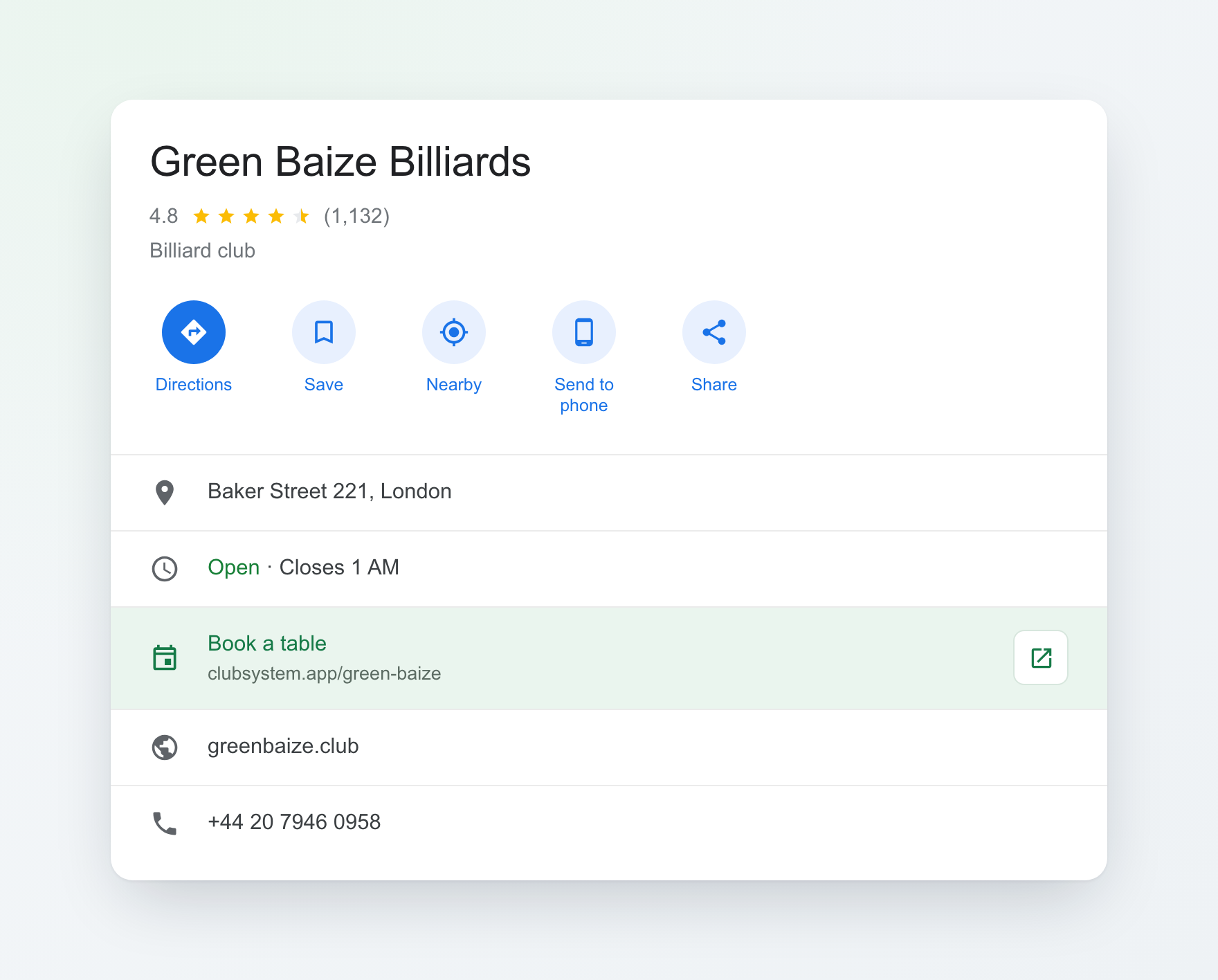
Open your Google Business Profile
Search your club name on Google, or go to business.google.com, and choose "Edit profile".
Go to Bookings → Add link
Under "Links to your online booking tools", select "Add a link" (or edit an existing one).
Paste your ClubSystem URL
Add your booking page address (clubsystem.app/your-club) and save.
Go live in a day or two
Google reviews the link, then shows it to everyone viewing your profile. No extra fees.
Need the exact clicks? See Google's step-by-step guide .
Guest experience
What does it look like for your customers?
Booking simplicity is key to customer satisfaction. ClubSystem offers an intuitive interface that works on any device.
Customer visits the booking page
Table availability visible immediately. Date, time and table type selection in a few clicks.
Provides phone number
Number used for verification and contact. No complicated forms or account registration.
Confirms booking with SMS code
SMS arrives within seconds. Customer enters the code and the booking is confirmed.
Receives confirmation
Email or SMS reminder before the visit. One-click cancellation option.
Infrastructure
Built to be reliable
Bookings work in the browser, with nothing to install. Light control adds a program on the computer at the bar and controllers in your electrical panel.
Cloud hosting
Data stored on secure servers. Automatic backups and updates without downtime.
GDPR & security
Full compliance with data protection regulations. SSL encrypted connections and secure data storage.
Responsive design
Works on any device — computer, tablet and smartphone. Interface adapts to screen size.
Ready to increase your bookings?
Start a free trial and see how the system can transform the way you manage your billiard club. No setup fees, no risk.